For engineers building production-grade agents whether for autonomous healthcare assistants, long-cycle legal discovery, or persistent coding partners the context window is the single greatest point of failure.
The "Context Crisis" isn't just about token limits; it's about Computational Gravity ($O(n^2)$ attention costs), Attention Decay ("Lost in the Middle"), and State Obsolescence.
To solve this, we must move from passive RAG to active Memory Control Loops. This post explores how to implement these patterns using the Functor SDK, shifting your agent's architecture from "stateless text processing" to "stateful cognitive continuity."
The Functor Memory System
Functor provides a multi-layer memory architecture designed for production AI systems. Rather than treating memory as a monolithic vector store, Functor decomposes it into specialized subsystems each optimized for a different cognitive function.
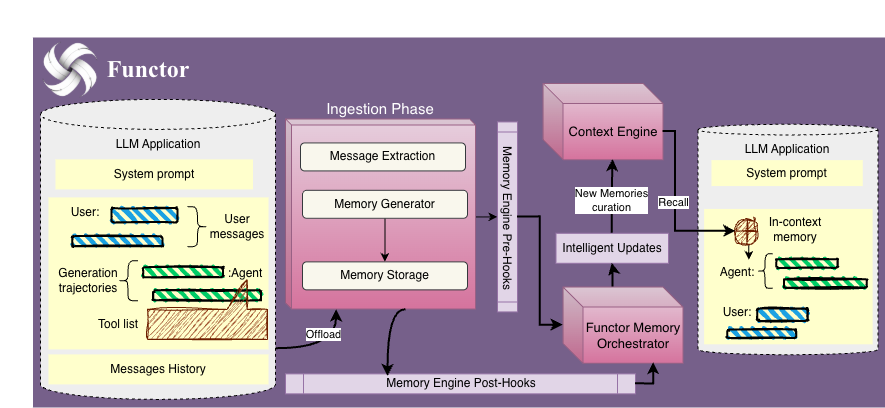
The architecture consists of 10 memory modules organized across three layers:
| Layer | Modules | Purpose |
|---|---|---|
| Cognitive | Episodic, Semantic, Procedural | Store what happened, what is known, and how to do things |
| Temporal | Short-term, Working, Buffer | Manage recency, active context, and overflow |
| Operational | Prospective, Multi-tenant, Rollout, Scratchpad | Handle reminders, isolation, simulations, and scratch space |
At the core sits a Knowledge Graph with entities, relations, and chunks backed by dual-store sync to Qdrant (vector search) and Neo4j (graph traversals). This enables both semantic similarity lookups and multi-hop relational reasoning in a single query.
The system is accessed through a unified REST API and the Functor SDK, abstracting away the complexity of coordinating multiple memory backends.
The Functor SDK
The Functor SDK allows you to orchestrate memory operations programmatically. It treats memory not as a static vector store, but as a dynamic graph of facts, events, and procedures.
Installation
# Using pip
pip install functor-sdk

# Using uv
uv pip install functor-sdk
Quick Start
Initializing the client is the first step to accessing the memory layer.
from functor_sdk import FunctorClient

# Auto-detects FUNCTOR_API_KEY from environment
client = FunctorClient()
Pattern 1: The Retrieve-Generate-Store Loop
The most fundamental pattern for a stateful agent is the Retrieve-Generate-Store loop. Instead of dumping raw history into the prompt, the agent actively retrieves relevant context, generates a response, and then systematically stores the interaction.
The Problem: Stateless Amnesia
If a user tells a fitness bot "I hurt my knee" on Tuesday, a stateless bot might suggest squats on Thursday. To prevent this, we need to capture critical facts and persist them across sessions.
Implementation
Derived from the Companion with Memory cookbook, this pattern ensures every interaction updates the agent's world model.
async def run_agent_loop(user_input, user_id):
    # 1. RETRIEVE: Search specifically for constraints and physical status
    # We filter by category to reduce noise in the prompt
    context = client.memory.search(
        query=user_input,
        user_id=user_id,
        filters={
            "categories": ["constraints", "injuries", "recovery"]
        },
        limit=3
    )
    # Result: ["Right knee soreness reported 2 days ago"]

    # 2. GENERATE: Call your LLM with the retrieved context
    system_prompt = f"Context: {context}\nUser: {user_input}"
    agent_response = await llm.generate(system_prompt)

    # 3. STORE: Persist the episode and extracting new facts
    client.memory.episodic.create(
        session_id="session_123",
        user_id=user_id,
        event_data={
            "query": user_input,
            "response": agent_response
        },
        summary="User asked about hill repeats; advised against due to knee injury."
    )

    # Explicitly store new semantic facts if detected
    if "knee feels better" in user_input:
        client.memory.semantic.add_fact(
            content="Knee injury is improving",
            user_id=user_id,
            metadata={"category": "recovery", "sentiment": "positive"}
        )
Key Takeaway: By separating episodic storage (conversation flow) from semantic storage (atomic facts), we build a memory that is both narrative and queryable.
Pattern 2: The Stateful Agent (Write-then-Read)
For customer support or enterprise agents, the "Cold Start" problem is critical. An agent should know a user's history before the first message is sent.
The Problem: Reactive Support
A user says "I can't log in." A reactive agent asks "What's your username?" A stateful agent checks the database and replies, "I see your account is locked due to a failed payment."
Implementation
We use a Write-then-Read architecture where external systems "prime" the memory before the conversation begins.
# Phase 1: Priming (Ingesting Heterogeneous Data)
event_log = {
    "event": "payment_failed",
    "reason": "card_expired",
    "timestamp": "2023-10-25T10:00:00Z"
}

# Convert structured event into a semantic fact
client.memory.semantic.add_fact(
    content=f"Payment failed on {event_log['timestamp']} because {event_log['reason']}",
    user_id="user_123",
    kg_name="support_kg",
    metadata={"source": "stripe", "type": "billing"}
)
# Phase 2: live Interaction
async def handle_support_ticket(user_message, user_id):
# Functor automatically searches KG, Semantic, and Episodic memory
context = client.memory.get_context(
query=user_message,
user_id=user_id,
kg_names=["support_kg"]
)
# The LLM now knows about the payment failure without the user mentioning it
print(context.formatted_string)
# Output: "Payment failed due to card expiration."Key Takeaway: Mixing rigid database events (Stripe logs) with unstructured chat history gives the agent a complete, "omniscient" view of the user.
Pattern 3: Dynamic Context Assembly via Graph Traversal
Generic RAG relies on vector similarity, which often fails at relational reasoning (e.g., "Find other products by the same brand as the item in my cart").
Implementation
Using the Functor SDK, we can perform Graph Traversals to assemble a precise, structured context block for the LLM.
# 1. Define the Ontology
client.kg.define_schema(
    kg_name="ecommerce_kg",
    schema={
        "entities": ["Product", "Brand", "Category"],
        "relations": ["PURCHASED", "MANUFACTURED_BY", "BELONGS_TO"]
    }
)

# 2. Execute Traversal (Product -> Brand -> Related Products)
# User asks: "Do you have socks for these?" (referring to shoes in cart)
cart_item_id = "prod_123"

related_products = client.graph.traverse(
    start_nodes=[cart_item_id],
    bg_name="ecommerce_kg",
    relationships=["MANUFACTURED_BY", "MANUFACTURES"], # Hop Up to Brand, then Down to Products
    depth=2,
    filters={"label": "Product", "category": "Socks"} # Only find Socks
)

print(related_products)
# Output: ["ProRunner Socks (Same Brand)", "Trail Socks (Same Brand)"]
Key Takeaway: Graph traversal allows for logical retrieval rather than just semantic retrieval, enabling complex reasoning chains that vector DBs miss.
Graph Memories: The Unified Knowledge Layer
At the core of Functor's architecture lies the Graph Memory system a unified layer that bridges the gap between unstructured text embeddings and structured knowledge. Unlike traditional vector stores that treat documents as flat chunks, Graph Memories model your data as a rich network of Entities, Relations, and Chunks with automatic dual-store synchronization.
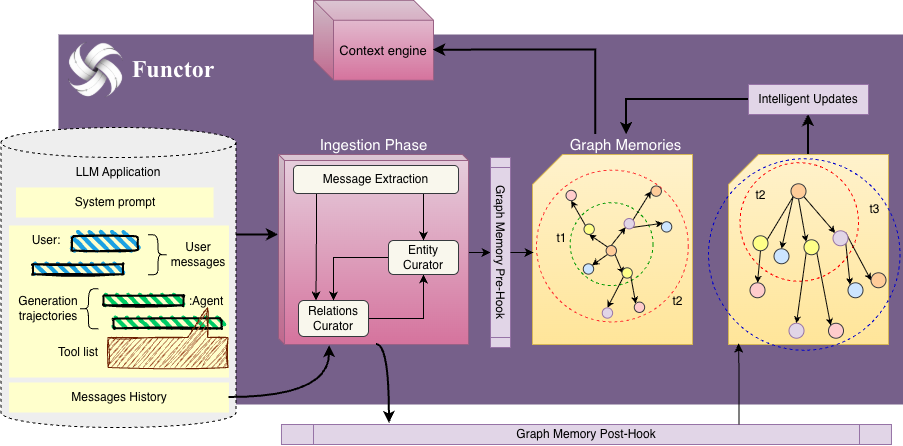
The Three Primitives
The diagram above illustrates the fundamental building blocks:
- Entities: Typed nodes representing domain concepts (
Person,Product,Event). Each entity carries a label, type, and property bag. - Relations: Directed edges connecting entities with semantic meaning (
PURCHASED,WORKS_AT,TREATS). Relations can also carry metadata like confidence scores and timestamps. - Chunks: Text snippets with vector embeddings, linked to the entities they reference enabling hybrid retrieval.
Dual-Store Synchronization
Every write operation can optionally sync to two backends:
- Qdrant (Vector Store): Enables semantic similarity search across entities and chunks.
- Neo4j (Graph Database): Enables Cypher-based traversals and relational reasoning.
This dual architecture means you can ask: "Find all entities semantically similar to X that are also within 2 hops of Y."
Creating Graph Memories with the SDK
Building a knowledge graph is as simple as calling the entity and relation APIs:
from functor_sdk import FunctorClient

client = FunctorClient()

# 1. Create the Knowledge Graph container
client.knowledge_graphs.create(
    kg_name="KG_Healthcare",
    display_name="Healthcare Knowledge Graph",
    domain="health",
    kg_type="domain"
)

# 2. Create Entities with automatic vector embedding
patient = client.knowledge_graphs.create_entity(
    kg_name="KG_Healthcare",
    label="John Doe",
    entity_type="PATIENT",
    properties={
        "age": 45,
        "risk_factors": ["diabetes", "hypertension"]
    },
    sync_to_qdrant=True  # Auto-embed for semantic search
)

medication = client.knowledge_graphs.create_entity(
    kg_name="KG_Healthcare",
    label="Metformin 500mg",
    entity_type="MEDICATION",
    properties={
        "class": "biguanide",
        "dosage": "500mg twice daily"
    },
    sync_to_qdrant=True
)

# 3. Create the Relation linking Patient to Medication
prescription = client.knowledge_graphs.create_relation(
    kg_name="KG_Healthcare",
    relation_type="PRESCRIBED",
    source_entity_id=patient.id,
    target_entity_id=medication.id,
    confidence_score=0.98,
    properties={
        "prescribed_date": "2024-01-15",
        "prescribing_physician": "Dr. Smith"
    },
    sync_to_neo4j=True  # Enable graph traversals
)

print(f"Created: {patient.label} --[{prescription.relation_type}]--> {medication.label}")
Multi-Modal Search: Semantic + Structural
Once your graph is populated, you can query it using multiple modalities:
# Semantic Search: Find entities by meaning
results = client.knowledge_graphs.search(
    kg_name="KG_Healthcare",
    query="patients with metabolic conditions",
    max_results=10,
    search_type="semantic"  # or "keyword", "hybrid"
)

# Federated Search: Search across multiple KGs simultaneously
federated = client.knowledge_graphs.federated_search(
    query="treatment protocols for chronic conditions",
    kg_names=["KG_Healthcare", "KG_Pharma", "KG_Research"],
    max_results_per_kg=5,
    fusion_method="weighted"  # or "rrf" (Reciprocal Rank Fusion)
)

for result in federated["results"]:
    print(f"[{result['kg_name']}] {result['content']} (score: {result['score']:.2f})")
Why Graph Memories Matter
| Approach | Retrieval Type | Handles "Related To"? | Multi-Hop Reasoning |
|---|---|---|---|
| Vector RAG | Semantic | ❌ No | ❌ No |
| SQL/Table | Exact Match | ⚠️ Limited | ❌ No |
| Graph Memory | Semantic + Structural | ✅ Yes | ✅ Yes |
By encoding relationships explicitly, the agent can answer questions like "What medications might interact with John's current prescriptions?" by traversing the INTERACTS_WITH edges something impossible with pure vector search.
Pattern 4: Hierarchical Context (Multi-Tenant)
In enterprise applications, data exists in scopes: User vs. Organization.
The Problem: Privacy vs. Utility
User A should know "Company Holiday Policy" (Shared), but User B should NOT know "User A's coffee preference" (Private).
Implementation
We maintain separate memory scopes and fuse them at query time.
# 1. Search User Memory (Private Scope)
user_context = client.memory.search(
    query="Show me family cars",
    user_id="user_alice",
    limit=2
)
# Result: "Alice has 3 kids" (Implies need for size)

# 2. Search Group Memory (Shared Scope)
group_context = client.memory.search(
    query="Show me family cars",
    user_id="org_toyota_north", # Shared Company ID
    limit=5
)
# Result: "Camry (Red)", "Sienna (Blue)"
The application logic then stacks these contexts ("Alice needs a big car" + "We have a Minivan") to generate the perfect recommendation without leaking data.
Pattern 5: Ingestion Governance
Building trust requires a Governance Layer to reject speculation and redact PII before it enters the memory graph.
Implementation
We can pass explicit instructions to the ingestion pipeline to act as a gatekeeper.
MEDICAL_POLICY = """
RULES:
1. Only extract medical conditions that are EXPLICITLY diagnosed.
2. Ignore phrases like "I think", "maybe", or "possibly".
3. REDACT all Social Security Numbers.
"""

# User speculates
client.memory.add_interaction(
    user_id="patient_123",
    text="I feel like I might have the flu, and my SSN is 123-45...",
    instructions=MEDICAL_POLICY
)
# Result: Zero facts extracted (Ignored due to speculation rule), PII redacted.
Conclusion
The transition from "Chatbot" to "Agent" is defined by memory. By using the Functor SDK to implement Active Memory Control Loops, Bi-Temporal Graphs, and Hierarchical Scoping, we transform LLMs from transient processors into persistent entities capable of long-term reasoning.
Start building with the SDK today:
pip install functor-sdk